Prezi Review: Is It Still Worth Using in 2025?
Prezi stood out in the early 2010s for its unique zooming presentations. But it’s 2025 now, and presentation software has evolved—fast. AI tools are changing the game completely.
If you’re trying to figure out whether Prezi is still relevant or if it’s time to switch to a smarter, faster AI-powered alternative, this review has you covered.
We’ll take a deep look at how Prezi works, who it’s best for, where it falls behind, and how it compares with today’s best AI presentation tools.
Who Is Prezi Best For?
Prezi has its strengths. If you’re the kind of presenter who thrives on visuals, movement, and storytelling, it might still be a good fit.
👍 I Recommend Prezi For:
- Teachers and educators who want to keep their students visually engaged
- Public speakers who build non-linear presentations or story arcs
- Content marketers who want to stand out at events or webinars
These use cases work well with Prezi’s zooming interface and emphasis on visual structure. But the learning curve and slower workflow may hold you back in fast-paced environments.
👎 I Don’t Recommend Prezi For:
- Startups or teams looking to create decks quickly
- Marketing and sales professionals who need real-time data and updates
- Collaborative teams that need live editing and version control
- Users who want AI to help, not get in the way
Prezi was built before the AI boom. Its core design hasn’t changed much, and while it now has some AI features, they’re basic compared to what’s out there today.
Prezi at a Glance: Pros and Cons
Here’s a quick breakdown of where Prezi shines—and where it struggles compared to modern presentation software.
| Feature | Verdict |
|---|---|
| Visual storytelling | ✅ One of the best for non-linear design |
| Templates | ✅ Decent range, though dated |
| AI tools | ❌ Limited and basic |
| User interface | ❌ Takes time to learn |
| Team collaboration | ❌ Weak compared to newer tools |
| Price-to-value | ⚠️ Affordable but lacking smart features |
What I Like About Prezi
Prezi still delivers a few things well, especially if you’re after creativity or visual flair.
- Unique zooming canvas: You don’t get that “wow” movement in PowerPoint or Google Slides
- Good for storytelling: If your content follows a narrative arc, Prezi makes transitions feel more fluid
- Template variety: Industry-specific layouts for education, sales, and marketing
- Presentation viewer: Works well embedded on websites or during remote meetings
What I Don’t Like About Prezi
The platform starts to fall apart when you compare it with AI-powered tools that help speed up creation and collaboration.
- AI feels like an afterthought: It won’t generate slides from prompts, structure your content, or automate design
- Workflow is manual: You’re still dragging and adjusting frames yourself
- Mobile editing is weak: It’s desktop-first, and the mobile experience is clunky
- No voice-to-slide or data integrations: Can’t pull from documents or spreadsheets like other tools
- No real-time updates: Forget collaborative live edits or syncing data into charts
My Experience Using Prezi
When you first sign up, Prezi guides you through a setup process that feels basic by 2025 standards. You create an account, choose a presentation type, and land in the editor. That’s where the friction starts.
Editor Overview
- The canvas is open and flexible, but it’s not intuitive.
- You create frames, zoom into sections, and manually arrange your layout.
- No AI prompts, no slide suggestions, no automatic content structuring.
Content Creation
- Everything is manual. You type in content, add visuals, and align frames.
- Prezi AI claims to help, but it’s limited to things like layout suggestions or simple phrasing tweaks.
- You can’t ask it to “create a deck on remote team culture” and have slides appear in seconds — unlike modern AI tools.
Template and Design Options
Prezi offers around 200+ templates depending on your plan. They’re organised by use case — marketing, sales, education — and you can start with a base design.
But there’s a catch:
What Works
- Templates are visually engaging, especially if you like motion and storytelling
- The zoom-based layout adds novelty and fluidity
What Doesn’t
- You can’t easily switch themes mid-project
- Mobile design editing is limited
- Customisation is time-consuming — expect to spend hours fine-tuning positions
- Only a handful of templates look modern or polished by today’s design standards
Compared to modern AI tools? You don’t get instant theme changes, responsive resizing, or smart slide layout generators.
Prezi Pricing Plans: Is It Worth the Cost?
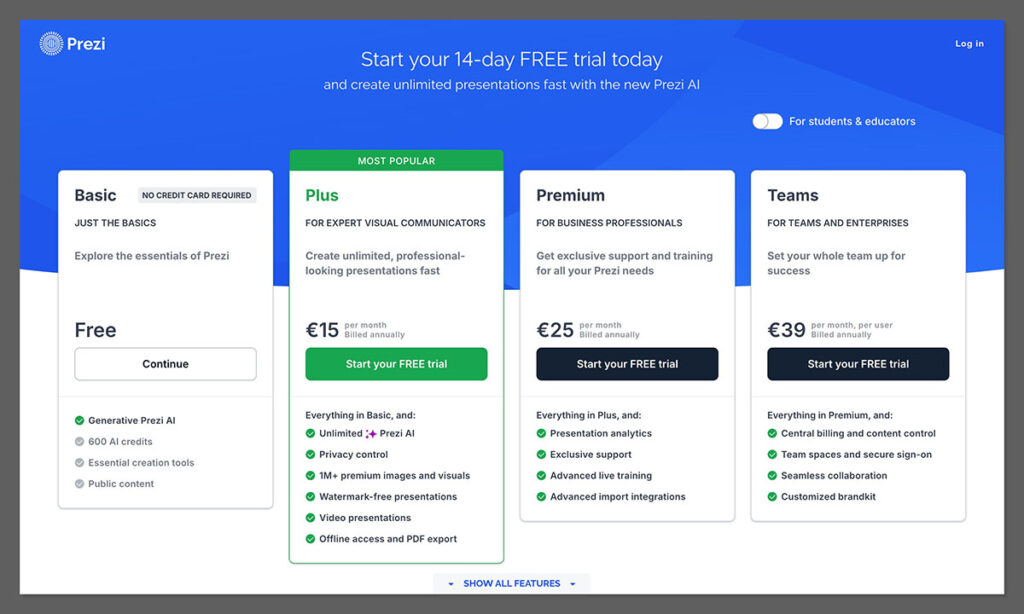
Prezi’s pricing is pretty straightforward, but the real question is — are you getting enough for what you’re paying?
Here’s a full look at the available plans:
| Plan | Monthly Price | Features Included | Best For |
|---|---|---|---|
| Basic | Free | Access to Prezi Present (limited features), limited storage | Students or casual users |
| Plus | $15 | Full access to Prezi Present, Prezi Video, offline access, premium support | Educators, freelancers, light business use |
| Premium | $25 | All features, analytics, training, priority support | Business professionals, sales teams |
| Teams | $39 | Admin controls, collaboration features, centralized billing | Companies and organisations |
What You Actually Get
Let’s break down what you’re really paying for:
The Good:
- You can start cheap with the Basic plan if you just want to create simple presentations
- Plus gives you more freedom with offline editing, better templates, and video recording
- Premium adds analytics — useful if you want to track how people interact with your decks
- The Teams plan is scalable — with admin features for managing large teams or enterprise setups
The Not-So-Great:
- Free plan is almost useless — You can view, but not edit or create anything
- AI features don’t scale with price — Even the Premium tier has minimal AI support
- Prezi Video is included, but it’s limited in editing tools and feels more like a gimmick
- Templates are locked behind higher tiers — and even then, they feel dated
- There’s no real-time collaboration, even in the Premium plan — a big miss in 2025
Value for Money — My Take
On paper, Prezi’s pricing seems affordable. But when you start using it, you’ll realise it just doesn’t compete with modern AI tools in terms of what you get for the price.
Compare this:
- $12/month for Prezi Plus: Manually create slides, no auto-generation, basic templates
- $10–$20/month for AI tools (Tome, Gamma, Beautiful.ai): Create full decks from prompts, smart layout suggestions, team collaboration, real-time updates
So, even though Prezi is relatively low-cost, you’re spending more time to create less intelligent presentations.
And time costs money.
If you’re an educator or student who likes the Prezi flow, the price might feel fair.
But for business teams, marketers, or content creators who want speed, automation, and results, Prezi quickly becomes outdated — especially when your competitors are building decks 10x faster using AI tools for the same price.
Prezi AI: Is It Actually Smart?
Prezi rolled out its AI tools in an effort to modernise the platform — but if you’re expecting the kind of slick, time-saving features you get from today’s AI-first presentation tools, you’re going to be underwhelmed.
Let’s break it down.
What Prezi AI Can Do
- Basic phrasing suggestions: If you write a sentence, Prezi AI might recommend an alternative version that’s slightly more polished or engaging
- Content prompts: In some templates, it gives you placeholder suggestions to help spark ideas
- Presentation structure tips: You’ll occasionally get a pop-up suggesting how to group slides or frames based on your topic
- AI-generated templates: These are more layout presets than true AI-designed presentations
This is surface-level assistance — more like spellcheck and nudges, rather than a smart assistant.
What Prezi AI Can’t Do (Which Others Can)
Let’s compare that to what modern AI presentation software can do today:
| Feature | Prezi AI | AI Presentation Tools (like Tome, Gamma, etc.) |
|---|---|---|
| Create slides from a prompt | ❌ | ✅ (“Make a deck on X topic”) |
| Auto-design with smart layouts | ❌ | ✅ Suggests visual themes based on content |
| Voice-to-slide generation | ❌ | ✅ Transcribe and build slides from spoken input |
| AI slide summaries | ❌ | ✅ Summarise text into short bullet slides |
| Real-time document ingestion | ❌ | ✅ Pull data from PDFs, links, spreadsheets |
| Custom tone of voice | ❌ | ✅ Set tone like “persuasive” or “formal” |
You can see the gap. Prezi AI doesn’t generate. It nudges.
And in 2025, when tools like Notion, SlidesAI, and your own AI solution are building decks from scratch with just a single prompt, Prezi’s AI feels frozen in time.
My Experience With Prezi AI
I tested Prezi’s AI assistant across multiple templates — including business pitches, educational lectures, and webinar slides. Here’s what I noticed:
- It suggested headings, but never full slide content
- It occasionally flagged awkward phrasing, but never rewrote anything for me
- It didn’t adapt based on my topic, audience, or content type
- It offered zero real-time collaboration, summarisation, or smart formatting
In short, it felt like Prezi AI was added just to check the box — not to solve real user problems.
Final Take: Prezi AI Isn’t Competitive
It’s not that Prezi AI is broken — it’s that it’s barely there. It won’t build slides for you. It won’t summarise your notes. It won’t reformat your ideas in a way that saves you hours.
So if you’re looking for a tool that does the heavy lifting, Prezi AI just isn’t built for that.
It’s more “helper bot” than “presentation co-pilot.”
And that’s not enough anymore.
Prezi vs AI Presentation Tools: The Breakdown
Let’s compare Prezi with what AI presentation tools are doing right now. Here’s what you miss by sticking with older software:
| Feature | Prezi | AI Tools (like Tome, Gamma, or yours) |
|---|---|---|
| Slide Creation | Manual | Auto-generated from prompts |
| Design Suggestions | Basic | Full slide-level smart edits |
| Collaboration | Basic | Real-time, live editing |
| AI Summarisation | No | Yes — summarise long docs instantly |
| Voice-to-slide | ❌ | ✅ Convert audio to slides |
| Real-time data | ❌ | ✅ Pull from Google Sheets, APIs |
| Speed | 2–4 hours to build | 15–30 minutes |
| Flexibility | Limited layout control | Full drag-and-drop or auto-layout |
The gap’s pretty clear: Prezi still leans on human effort, while AI tools do the heavy lifting.
Final Verdict: Should You Still Use Prezi?
If you’re someone who loves full creative control and enjoys manually building presentations from scratch, Prezi could still work for you. It has charm. The motion graphics look great when done right.
But if you care about:
- Saving time
- Team collaboration
- AI-driven content and design
- Modern workflows
Then Prezi just doesn’t cut it anymore.
Today’s best presentation tools can:
- Turn a doc or outline into a slide deck in under 5 minutes
- Offer real-time edits for remote teams
- Suggest layouts, reword slides, and even build charts from live data
- Help you stay in flow without the manual grind