Slidesgo vs Gamma: Speed, Export Quality, and Pricing Compared
You need a deck by tomorrow, and you’re staring at two very different paths. One option, Gamma, builds the whole thing from a single prompt while you watch. The other, Slidesgo, hands you 30,000+ polished templates and lets you take it from there. The slidesgo vs gamma decision isn’t really about which AI presentation maker is “better,” because they solve the same problem from opposite ends.
Key Takeaways
- Gamma builds a full deck from a prompt in roughly 45 to 47 seconds, content, layout, and images included.
- Slidesgo gives you 30,000+ editable templates across Google Slides, PowerPoint, and Canva, plus an AI generator bolted on top.
- Gamma wins for speed, AI generation, web sharing, and collaboration, with real-time co-editing and per-viewer analytics.
- Slidesgo wins on budget, template variety, education tools, and clean PowerPoint export, starting around $3 per month annually.
- Gamma’s PowerPoint export is only ~30% editable, the single biggest gotcha for anyone who has to hand off a .pptx.
- Both tools have documented billing and cancellation complaints, so set up your subscription carefully on either one.
Here’s how they stack up criterion by criterion, so you can match the right tool to your actual use case.
How Do Slidesgo and Gamma Compare?
These two barely compete on the same axis. Gamma is an AI-native generator built for the web, and Slidesgo is a template library built for Google Slides and PowerPoint. A single table makes the trade-offs obvious before we go deep.
| Feature | Slidesgo | Gamma |
|---|---|---|
| Best for | Templates, education, clean PPTX export, tight budgets | Fast AI decks, web sharing, teams, analytics |
| Core approach | Template-first library with AI add-on | AI-native generator, card-based web format |
| Starting price | $5.99/mo monthly or ~$3/mo annual | ~$8-9/mo annual (Plus), $10/mo monthly |
| Free plan | 3 downloads + 3 AI presentations/mo, attribution required | 400 lifetime credits (~10 decks), watermark |
| Template library | 30,000+ (Google Slides, PowerPoint, Canva) | No big static library, 100+ themes, AI-generated layouts |
| AI generation | Full deck in under 60 seconds, generic first draft | Full 10-slide deck in ~45-47 seconds, multiple AI models |
| Real-time collaboration | None (relies on Google Slides/PowerPoint) | Yes, multi-user editing, comments, shared folders |
| Viewer analytics | None | Per-viewer tracking on Pro |
| PowerPoint export quality | Clean, fully editable | ~30% editable, architectural problem |
| Third-party integrations | None (no API, no Zapier) | 8,000+ via Zapier/Make, plus API on Pro |
What is Slidesgo?
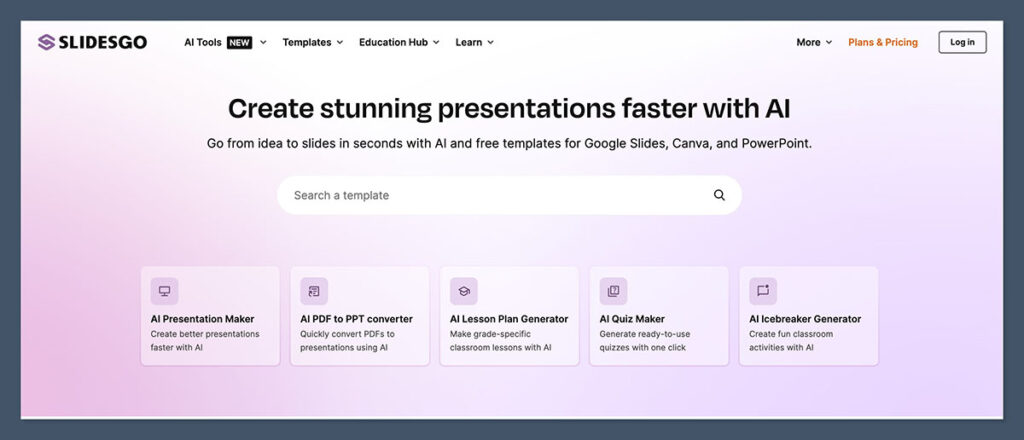
Slidesgo is a template library that grew an AI editor. You browse 30,000+ professionally designed templates, pick one, and edit it in Google Slides, PowerPoint, or Canva. It’s owned within the Freepik ecosystem, so its real strengths are design variety, education tools, and a very low price.
What is Gamma?
Gamma is an AI-first tool that generates entire decks, websites, and social posts from a prompt. Its output lives as scrollable cards optimized for the web, not traditional 16:9 slides. With 70M users and $100M ARR, it’s the category’s momentum leader, but it’s built for sharing links, not exporting files.
Which Tool Builds a Deck Faster (and Better) With AI?
For genuine hands-off AI generation, Gamma wins, and it isn’t a close call. You type a topic, paste an outline, or upload a document, and Gamma builds a complete 10-slide deck in about 45 to 47 seconds while you watch the layouts, copy, and images appear in real time. Slidesgo’s AI Presentation Maker also generates a full deck in under 60 seconds, but the result is template-matched output you’re then expected to edit heavily.
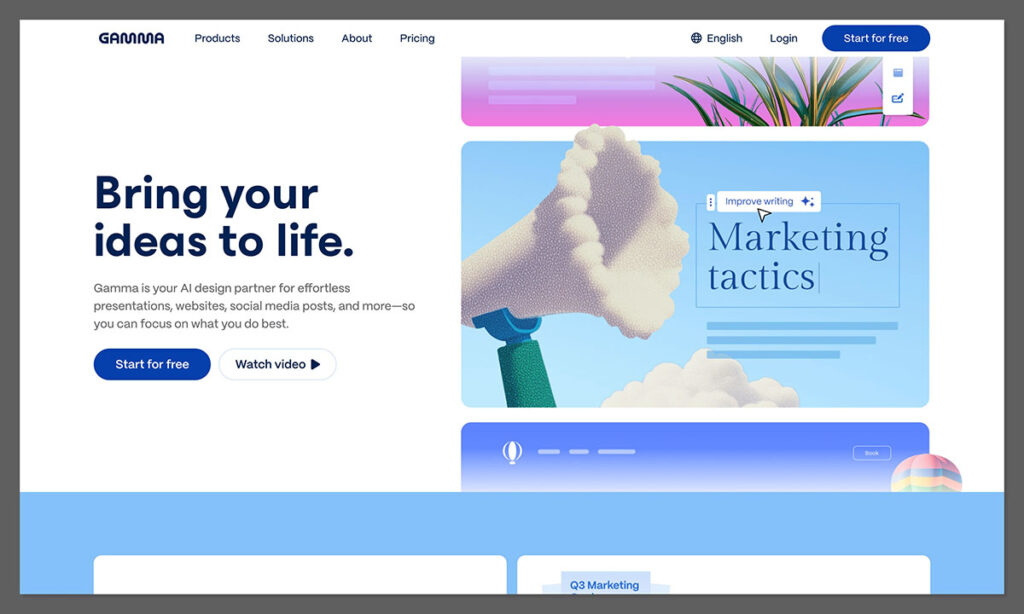
The difference is philosophical. Gamma is AI-first end to end, handling narrative flow, layout, and image selection as one motion. Slidesgo’s AI is, in the words of multiple independent testers, “bolted on rather than core,” producing a structural outline that works as a first-draft accelerator but not a finished deck.
The head-to-head testing backs this up. In GeniusFirms’ three-prompt showdown, Gamma won the startup pitch deck and the SaaS marketing proposal because its first draft was simply more usable. Slidesgo won the climate-change classroom prompt thanks to its stronger education templates. Fahim AI, who spent $50 testing both, clocked Gamma at 47 seconds versus Slidesgo’s 2-plus minutes and gave Gamma 7 of 10 categories.
Gamma also lets you pick the engine, running content through Claude, GPT, or Gemini and images through Flux, Imagen 3, GPT Image, or Luma Photon. That model flexibility means you can swap image styles if the first pass looks off, which Slidesgo can’t match. The classification gap tells the story: industry roundups like Plus AI’s don’t even list Slidesgo as an AI presentation maker, treating it as a template library instead.
Slidesgo’s generator does scale, starting at 14 slides and expanding to 85 across 24 visual styles, and it accepts Word, PDF, or Markdown uploads on Premium. The verdict: Gamma is the real AI generation tool here, while Slidesgo’s AI is a useful bonus on top of its templates, not the main event.
Templates and Design: Variety vs AI-Generated Layouts
For template variety and design choice, Slidesgo wins decisively, and the gap is enormous. Slidesgo offers 30,000+ templates spanning business, education, marketing, healthcare, and creative work, available in Google Slides, PowerPoint, and Canva formats. That figure causes confusion, so let’s settle it: 30,000+ is the current confirmed library count, while the “800+” number you’ll see floating around refers only to the design styles inside the in-browser AI editor.
Every template pulls icons and images from Freepik and Flaticon, which keeps the design assets consistent and deep. You’re choosing a polished starting point rather than rolling the dice on what an AI produces. All three export formats stay fully editable, so a marketing team and a teacher can pull the same template into Google Slides, PowerPoint, or Canva.
Gamma takes the opposite approach. It doesn’t lean on a big static library at all, instead generating layouts dynamically from your prompt plus 100+ themes. That delivers consistency and a clean modern look, but far fewer manual starting points if you want to browse and pick. Its Smart Diagrams (Venn charts, flowcharts, org charts, 12+ formats via the /smart command) fill in structured visuals that template-pickers would otherwise hunt for.
The library breadth has practical payoff. One tester reported their build time dropping from 3 to 4 hours per presentation down to 30 to 45 minutes once they started from a Slidesgo template, with their own design-quality self-rating jumping from 5/10 to 8/10. That’s the value of starting from something polished instead of a blank canvas.
Both tools have honest weaknesses here. Slidesgo’s templates are “widely reused, not unique,” so if brand differentiation matters, you’ll see your layout in other people’s decks. Gamma’s modern minimalist house style is great for business but weak for design-heavy or creative work, and its font choices are restricted to sans-serif. For a design agency building a creative portfolio, that restriction is disqualifying. Best for: choose Slidesgo if you want to hand-pick a designed template. Skip it for Gamma if you’d rather not choose at all and trust the AI’s house style.
Which Tool Gives You More Control Over the Final Result?
For granular control and edit-ability, Slidesgo wins, because the final editing happens in tools you fully own. Slidesgo templates are completely editable, fonts, colors, animations, and layout, inside PowerPoint or Google Slides. Gamma offers guided customization with real limits: you can’t set precise font sizes, you’re locked to modern sans-serif styles, and there’s no offline mode, which makes deep personalization tricky.
Then there’s content accuracy, the thing most comparisons hand-wave. Gamma’s AI copy looks polished but can invent data. One documented example had Gamma displaying Netflix’s 2023 revenue labeled as 2024, exactly the kind of error that survives a quick skim and embarrasses you in a meeting. Users also report the Gamma Agent “simply does not listen” on certain edits, ignoring instructions you’ve clearly given.
Slidesgo’s AI content has a different flaw. It’s structurally sound but generic, described by Fritz.ai as “more like a quick idea starter than a full deck writer.” It won’t hallucinate revenue figures, but it also won’t carry a complex narrative for you.
There’s also the workspace-branding gap. Per Capterra reviews, Gamma teams report that brand consistency, PowerPoint exports, and AI credit limits all create friction at the workspace level, and custom branding is locked behind the $15-18/month Pro tier. Slidesgo sidesteps that entirely because your brand kit lives in PowerPoint or Google Slides, where you already control it.
The honest takeaway: both tools need a human fact-checking and editing pass, so neither is fully hands-off. My direct recommendation is to build in Slidesgo plus your slide editor when you need precise brand control or accurate data slides. If “good enough and fast” wins the day, Gamma is fine, provided someone proofreads before it ships.
Export and Compatibility: The PowerPoint Problem
If you need an editable PowerPoint file, Slidesgo wins, full stop. This is the single most important difference for most buyers, and it’s where Gamma falls apart. Gamma’s PPTX export is only about 30% editable: in benchmark testing, 19 of 25 exported decks needed manual fixes, and 30 to 40% of slides flatten into uneditable images. Slidesgo, by contrast, tested clean across 12 decks with no broken layouts or missing fonts.
Here’s how Gamma’s export quality compares against the field:
| Tool | PPTX editable rate |
|---|---|
| Slidesgo | Clean / fully native |
| Plus AI | 95% |
| Beautiful.ai | 88% |
| SlideGMM | 84% |
| Gamma | ~30% |
Six specific things break when you export a Gamma deck to PowerPoint:
- Animations are completely removed.
- Web fonts substitute to Calibri or Arial.
- High-res images get downsampled and pixelated.
- Complex layouts (overlapping text, custom backgrounds, multi-column) flatten into single uneditable images.
- Interactive elements like embedded video and live data become static placeholders.
- Slide dimensions occasionally shift between 4:3 and 16:9.
Critically, this is architectural, rooted in Gamma’s web-first rendering pipeline, so paying for Pro does NOT fix it. The Plus and Pro plans export exactly as badly as the free tier. Gamma has shipped incremental fixes (better font substitution in 2024, steadier slide dimensions in 2025), but the full rewrite stays too expensive to prioritize. On Reddit, PowerPoint export ranks as the category’s #1 unmet need, with users predicting whoever solves it wins meaningful market share. One marketer summed up the cost after exporting a client deck: “Spent 4 hours fixing it manually.”
Your workarounds:
- Export as PDF for read-only audiences (preserves visual fidelity, ready in seconds).
- Switch to Plus AI or Beautiful.ai if you genuinely need native, editable .pptx.
- Rebuild manually in PowerPoint, budgeting 4 to 8 hours per deck.
Gamma’s card format is a feature when the deck stays a live link and a bug when it has to become slides. Quick comparison: Slidesgo fits Google and Microsoft workflows natively, while Gamma fits only when the deck lives as a Gamma link.
Collaboration, Analytics, and Web Sharing
For collaboration and sharing, Gamma wins clearly, and Slidesgo doesn’t really compete. Gamma supports real-time multi-user editing, chat-based feedback and comments, and shared folders with team workspaces. On Team and Business plans those workspaces add centralized billing, admin controls, and SSO. The Gamma 2.0 editor that shipped in February 2026 fixed the old slowdown that used to plague large decks, so co-editing finally feels smooth.
The analytics edge is the standout. On the Pro plan, Gamma tracks per-viewer data:
- Unique viewer count over the last 30 days
- Relative Time Spent Per Card
- Percentage of Views Per Card
- Cards Viewed (how far each person scrolled)
- Viewing timestamps
For sales reps and consultants who need to know which slide made an investor pause, that’s genuinely useful intelligence. Anonymous viewers without a Gamma account still register as “Anonymous Viewer,” so you capture engagement even from cold prospects. On a SaaS proposal, that reveals which slide a prospect lingered on before replying, intelligence a static file can’t give you. Gamma also publishes decks as live web pages on a Gamma subdomain or custom domain (10 on Pro, 100 on Ultra), with embedded video and live data that actually work. Figma and Miro embeds survive in that live format too, which a static .pptx could never carry.
Slidesgo’s reality is stark by comparison: zero native collaboration and zero viewer analytics. There’s no way to know whether your deck was ever opened, and any co-editing happens in Google Slides or PowerPoint after you export. Best for: pick Gamma if you share decks as links and care who engaged with them. Skip it for Slidesgo if your team already lives in Google or Microsoft and that’s your collaboration layer anyway.
Slidesgo vs Gamma Pricing and Free Plans
On price, Slidesgo wins outright: Premium runs about $3 per month annually, 2.7 to 5x cheaper than Gamma Plus. Reviews quote wildly different prices because they mix monthly versus annual billing and Gamma’s many tiers, so let me settle the real numbers, then show how far each free plan actually gets you.
Slidesgo plans:
- Free ($0): 3 template downloads and 3 AI presentations per month, attribution slide required, ad-supported.
- Premium ($5.99/mo monthly OR $35.99/year, which works out to ~$3/mo annual): no attribution, with a soft cap of 150 downloads and 150 AI generations per month.
Gamma plans:
- Free ($0): 400 one-time lifetime credits (~10 decks at ~40 credits each), “Made with Gamma” watermark, 10 cards per prompt.
- Plus (~$8-9/mo annual or $10/mo monthly): standard generation effectively unlimited, 1,000 credits/month (rollover cap 2,000), 20 cards per prompt, no watermark.
- Pro (~$15-18/mo annual or $19-20/mo monthly): adds custom branding, API access, 10 custom domains, per-viewer analytics, 4,000 credits/month (rollover cap 8,000), 60 cards per prompt.
- Ultra ($90/seat/mo, no annual discount), Team ($20/seat/mo, 2-seat minimum), and Business ($40/seat/mo, 10-seat minimum) for heavier and enterprise needs.
| Slidesgo | Gamma | |
|---|---|---|
| Free plan | 3 downloads + 3 AI gens/mo, attribution | 400 lifetime credits, watermark |
| Entry paid (monthly) | $5.99/mo | $10/mo (Plus) |
| Entry paid (annual/mo) | ~$3/mo | ~$8-9/mo (Plus) |
| What entry unlocks | No attribution, 150/mo downloads + AI | Unlimited standard generation, no watermark, 20 cards |
| Mid tier | (none, Premium is the top tier) | Pro ~$15-18/mo: branding, API, analytics |
| Notable cap | 150/mo soft cap on “unlimited” | 400 free credits are lifetime, not monthly |
Two nuances trip up almost everyone. First, Gamma’s 400 free credits are lifetime, not monthly, so users routinely burn them experimenting in a single session and hit a wall. Second, on paid plans those credit counts barely matter, because standard deck and image generation is effectively unlimited. Credits are only consumed by Gamma Agent edits, Ultra models, and API calls. A few billing gotchas round it out: there’s no pause option (you cancel and resubscribe, and cancelling strips any credits above 400), extra credits cost $6 per 1,500-credit block, and the refund window is just 3 days.
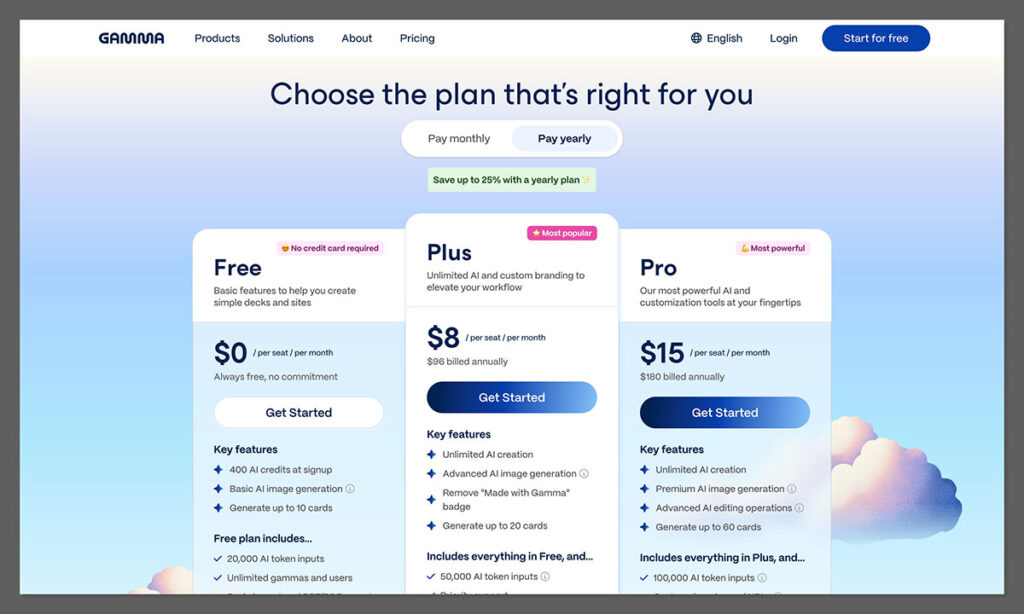
The free-plan walls land differently. Slidesgo caps you at 3 downloads a month with a mandatory attribution slide. Gamma gives you a generous-looking 400 credits that never refresh, plus a watermark. My direct recommendation: grab Slidesgo Premium annual if you’re a budget or template user, and Gamma Plus if your main value is AI generation and web sharing.
Beyond Slides: Ecosystem, AI Models, and What Else Each Tool Does
These two are no longer the same kind of product, and the gap is widening fast. On sheer breadth, Gamma wins: it’s becoming an all-in-one visual platform, while Slidesgo is doubling down on templates and the classroom.
Gamma’s recent expansion:
- Gamma 3.0 (September 2025) introduced the Gamma Agent, which makes sweeping natural-language edits across every slide (“make it more visual” rescans each card and updates it).
- API (beta for Pro) powers automation through Zapier, Make, and N8N, including CRM-to-deck pipelines that spin 100+ personalized decks from one template.
- Social formats for Instagram posts and stories, LinkedIn carousels, and Twitter threads.
- Websites publishable on custom domains, plus documents, in the same workspace.
- Smart Diagrams via the /smart command, covering 12+ chart types.
- Claude MCP integration, letting you build a fully designed Gamma deck from inside Claude.
- 65+ languages and multiple image models (Flux, Imagen 3, GPT Image, Luma Photon).
Slidesgo’s ecosystem:
- Education suite: AI Lesson Plan Generator, AI Quiz Generator, AI Icebreaker Generator, and Slidesclass (teacher-verified premium lessons).
- PDF-to-PPT converter for repurposing existing documents.
- AI Writer and Translator for quick copy work.
- Freepik and Flaticon asset libraries baked into every template.
- Canva format support alongside Google Slides and PowerPoint.
The divergence is clear. Gamma is a broad visual platform for modern business creators, while Slidesgo is a deep template and education library. A marketing team can use Gamma’s API to turn CRM records into 100-plus personalized decks or pipe Zoom transcripts straight into meeting recaps, none of which Slidesgo can touch. A teacher, meanwhile, gets curriculum-shaped tools from Slidesgo that Gamma simply doesn’t build.
On stability, Gamma is reassuring: profitable at $100M ARR, 70M users, and a $2.1B valuation, with its AI trained on a dataset of 3.5 million decks. The verdict: pick based on the second job you’ll hire the tool for, not just the slides.
Reliability and What Real Users Complain About
On reliability, this is a draw, and not a flattering one: both tools carry documented billing complaints that never show up in feature tables. Each has a trust problem worth knowing before you enter a credit card.
Slidesgo’s reliability risks:
- Trustpilot sits around 2.4/5.
- Over 20% of negative reviews cite billing or cancellation issues.
- The cancellation page reportedly throws 500 errors, making it hard to actually cancel.
- Users report charges continuing after a documented cancellation.
- The policy is no refunds once payment is made.
Gamma’s complaints:
- The 400 free credits burn out in a single experimenting session.
- PowerPoint export is the #1 unresolved pain point on Reddit for the whole category.
- The Gamma Agent doesn’t always follow editing instructions.
- A strict no-refund policy drags Trustpilot down to 2.0/5.
There’s a usage-cost angle too. Consultants who iterate constantly, often 10-plus revisions per deck, report that credit consumption on Agent edits adds up fast compared to flat-rate alternatives. If you’re a heavy iterator, price out a month of real usage before you commit.
To be fair to Gamma, its low Trustpilot score is billing-and-support-driven, not a verdict on product quality. G2 rates it 4.3 and Capterra 3.7, because team and link-sharing users (Gamma’s intended audience) are genuinely happy. The company is also actively improving, as the February 2026 editor update that resolved large-deck slowdowns showed.
Practical protections: on Slidesgo, start with the monthly plan and screenshot every cancellation attempt with a timestamp. On Gamma, don’t burn your free credits on idle experimentation if you plan to rely on the tool later. Quick comparison: neither is a scam, but both reward a cautious billing setup.
The Bottom Line: Which Should You Choose?
There’s no single winner here, because these tools answer different questions. Gamma is the AI-first web tool that wins on speed, generation, teamwork, and sharing, while Slidesgo is the template-first editable library that wins on budget, design variety, education, and clean PowerPoint output. GeniusFirms’ testing maps it cleanly: students, teachers, and designers land on Slidesgo, while founders, marketing teams, corporate teams, and non-designers land on Gamma.
| Use case | Winner | Why |
|---|---|---|
| Fast AI deck from a prompt | Gamma | Full structured deck in ~47 seconds |
| Biggest template selection | Slidesgo | 30,000+ designs across three formats |
| Editable PowerPoint handoff | Slidesgo | Clean exports vs Gamma’s ~30% editable |
| Students and teachers | Slidesgo | Education tools plus $3/mo annual |
| Startup pitch, sales, marketing decks | Gamma | More usable AI first draft |
| Team collaboration + viewer analytics | Gamma | Real-time editing, per-viewer tracking |
| Tightest budget | Slidesgo | ~$3/mo annual, 2.7-5x cheaper |
| Websites, social, automation beyond slides | Gamma | API, social formats, custom domains |
| Brand-critical design control | Slidesgo | Full editing in PowerPoint/Google Slides |
Plenty of people use both. The community’s favorite workaround is to draft fast in Gamma, then rebuild and polish the deck inside a Slidesgo template to get a clean, editable .pptx. That tool-stacking move sidesteps Gamma’s export problem while keeping its generation speed, and it’s the single most-recommended fix in the Reddit threads on Gamma’s export gap.
Your next action: try each free tier on one real deck this week. Gamma’s 400 credits and Slidesgo’s free downloads are enough to test the two things that actually matter, output quality and export, then commit based on where your deck has to live.
Slidesgo vs Gamma FAQ
Is Slidesgo or Gamma better?
It depends entirely on your use case. Gamma is better for fast AI generation, team collaboration, web sharing, and analytics. Slidesgo is better for template variety, education, budget, and clean PowerPoint export. If you need an editable .pptx or you’re a teacher, pick Slidesgo. If you want a polished deck generated in under a minute and shared as a link, pick Gamma.
Is Gamma’s 400 free credits monthly or lifetime?
Lifetime. The 400 credits are a one-time allocation that never refreshes. At roughly 40 credits per presentation, that’s about 10 full decks total, forever. Many users assume the credits reset monthly and burn through 200 of them in their first hour of experimenting, then hit an immediate paywall. Once they’re gone, you must upgrade to a paid plan.
How much does Gamma cost?
Gamma’s Free plan gives you 400 lifetime credits. Plus runs about $8-9/month annually (or $10 monthly) with effectively unlimited standard generation. Pro is roughly $15-18/month annually and adds custom branding, API access, custom domains, and per-viewer analytics. Ultra is $90/month with no annual discount, and Team and Business plans run $20 and $40 per seat.
How much does Slidesgo cost?
Slidesgo Premium costs $5.99/month on monthly billing or $35.99/year, which works out to about $3/month annually. The free plan includes 3 template downloads and 3 AI presentations per month, but requires a Slidesgo attribution slide on every download. Premium removes attribution and lifts you to a soft cap of 150 downloads and 150 AI generations per month.
Can Gamma export an editable PowerPoint?
Technically yes, but expect serious problems. Gamma’s PPTX export is only about 30% editable, with 30 to 40% of slides flattening into uneditable images, fonts swapping to Calibri or Arial, and animations disappearing. This is architectural, not a paywall, so paying for Pro does not fix it. Use PDF export for read-only audiences, or switch to Plus AI (95% editable) for native files.
Which is better for students and teachers?
Slidesgo, clearly. It offers subject-specific education templates plus an AI Lesson Plan Generator, Quiz Generator, Icebreaker Generator, and Slidesclass teacher-verified lessons. It also exports cleanly to Google Slides, which most classrooms already use, and costs about $3/month annually. Gamma is stronger for business and professional decks but lacks education-specific curriculum tools entirely.
Can I use both together?
Yes, and many people do. The common workflow is to draft a deck fast in Gamma, taking advantage of its AI generation, then rebuild and polish it inside a Slidesgo template so you end up with a clean, fully editable .pptx. This tool-stacking approach gives you Gamma’s speed while sidestepping its weak PowerPoint export, which is the community’s recommended fix.