Gamma vs PowerPoint: The Honest Head-to-Head Comparison
Quick Answer:Gamma wins for speed, first drafts, and link-based sharing; PowerPoint wins for precision, offline access, and data-heavy or brand-strict decks. Gamma builds a full deck from one prompt in under a minute and starts at $9 per seat monthly, while PowerPoint plus Copilot runs roughly $30.50 to $43 per user monthly on business plans. Neither fully replaces the other, so the best setup for most people is a hybrid: draft in Gamma, then finalize in PowerPoint.
Microsoft PowerPoint has been the default way to make a slide since 1987. Gamma is a roughly 50-person, profitable startup that just raised at a $2.1 billion valuation, and its lead investor, Andreessen Horowitz, is openly branding it “the anti-PowerPoint.” So the real PowerPoint vs Gamma question is this: does a 39-year-old workflow still deserve your next deck, or does an AI presentation maker build a better one before your coffee cools?
The honest answer depends on the job the deck has to do. PowerPoint is file-first: a portable .pptx you email, edit offline, and hand to anyone. Gamma is web-first: describe the deck, it generates a responsive web page, you share a link. As a16z put it, “PowerPoint is your therapist, Gamma is your coach.”
This guide delivers what competitors skip: verified current pricing, real generation quality, export behavior, review scores, and a verdict by reader type.
Key Takeaways
- Gamma builds a full deck from one prompt in under a minute, while PowerPoint gives you total manual control.
- Gamma is cheaper on sticker price: Plus $9 and Pro $18 per seat monthly, versus roughly $30.50 to $43 per user monthly for PowerPoint plus Copilot.
- Gamma is web-first, PowerPoint is file-first, and that split decides more than any feature list.
- Gamma’s PowerPoint export is lossy in documented, predictable ways.
- Neither tool fully replaces the other for heavy data visualization or strict corporate templates.
- For many people the best answer is a hybrid: draft in Gamma, finalize in PowerPoint.
PowerPoint and Gamma at a Glance
A 50-person team just convinced Andreessen Horowitz that a tool most people have never opened is worth $2.1 billion. That is the scale of the challenger PowerPoint now faces.
Microsoft PowerPoint is traditional slide-object software. You place text boxes, shapes, and charts on a blank canvas, save a .pptx file, and that file works offline and opens on almost any machine. It carries the deepest ties to the Microsoft ecosystem (Word, Excel, Outlook, Teams, OneDrive), and it now has an optional AI layer called Copilot.
Gamma is an AI-first, card-based generator. You give it a prompt and it produces a presentation, and the same engine also outputs documents, web pages, and social posts. Each “slide” is a card in a responsive web page, shared as a live link rather than downloaded as a file.
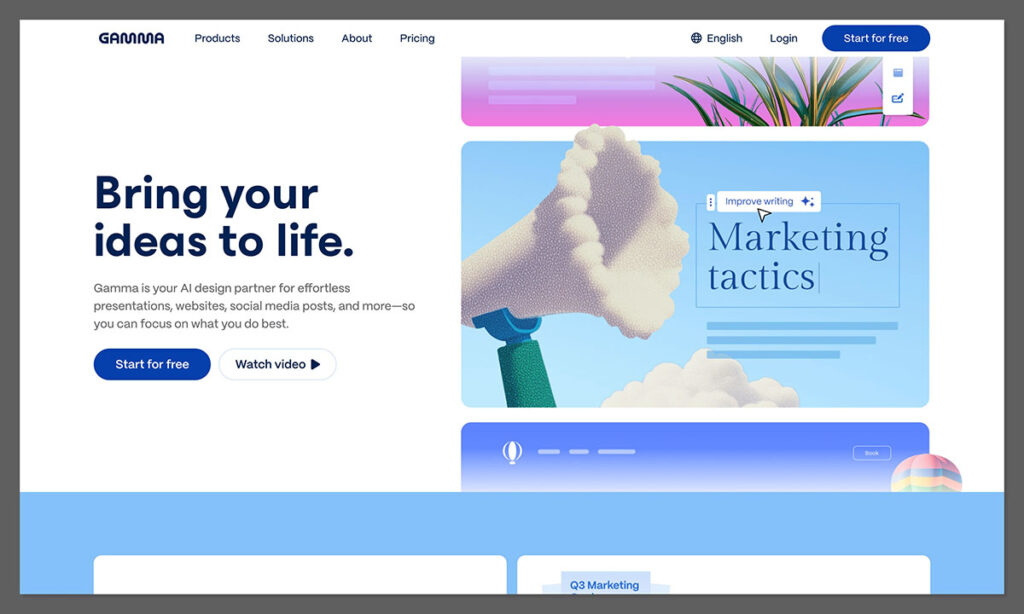
Gamma is not a hobby project. It reached $100M+ ARR and a $2.1 billion valuation after a $68M Series B led by a16z, has been profitable for over two years, and serves roughly 70 million users, including more than 600,000 paying subscribers. That said, PowerPoint’s incumbency is itself a feature: it is already installed, already cleared by IT, and already familiar to every colleague you will ever email a deck.
| Dimension | Microsoft PowerPoint | Gamma |
|---|---|---|
| Best for | Precision, offline, portable files | Speed, first drafts, web sharing |
| Starting price (paid) | $9.99/mo (Microsoft 365 Personal) | $9/seat/mo (Plus) |
| Free option | PowerPoint for web, free indefinitely (limited) | 400 one-time credits (~10 decks), non-refreshing |
| AI generation | Copilot add-on (paid); builds from a prompt or a Word/PDF | Native, multi-model; builds from a prompt in under a minute |
| Offline access | Full offline desktop app | None; web plus iOS/Android only |
| Export / portability | Native .pptx, universally openable | PDF/PPTX/PNG/Slides, lossy on complex decks |
| Collaboration & sharing | Real-time co-authoring via OneDrive/Teams; shares a file | Real-time editing; shares a live responsive link |
| Platform support | Windows, Mac, web, iOS, Android | Web plus iOS/Android (no desktop app) |
| Company / maturity | Microsoft, shipping since 1987 | ~50-person startup, $2.1B valuation, ~70M users |
| Standout weakness | Copilot’s true cost stacks to $30-$43/user/mo | No-refund-past-3-days policy; lossy export |
The next seven sections score this head-to-head, criterion by criterion.
1. AI Generation Speed: Gamma vs Copilot in PowerPoint
Type one sentence, wait, and a finished deck appears. Gamma builds a full presentation, structure, copy, and visuals included, from a single prompt in well under a minute.
Both tools generate now. PowerPoint got its own AI layer in Copilot, so the real difference is the on-ramp: what you feed each tool and how fast it turns that into slides.
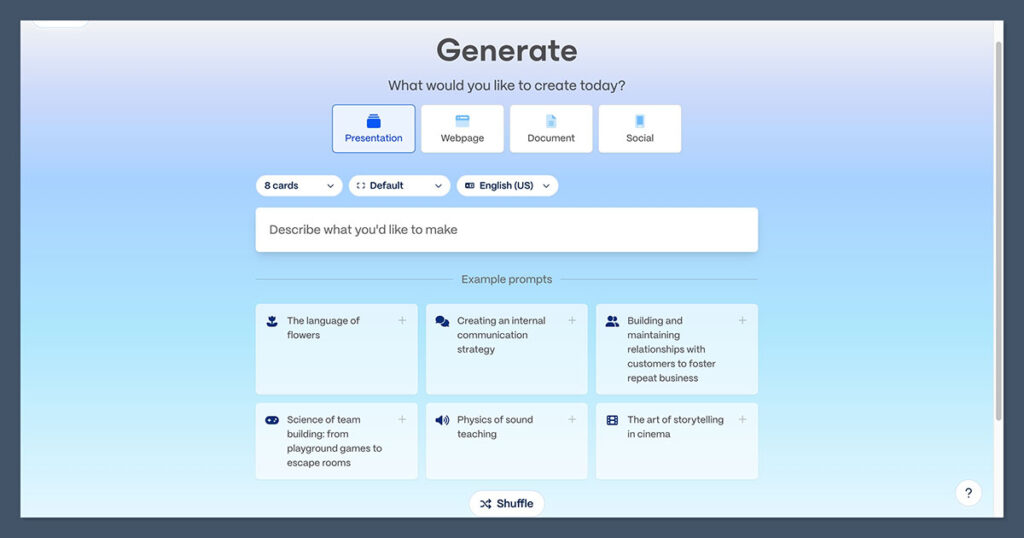
Gamma gives you four ways in: Generate from a prompt, Paste Text from existing notes, Import a file or URL, or Generate from a template. Whichever you pick, it drafts an editable outline first, so you can add, cut, or reorder topics before it commits to a full deck.
Copilot in PowerPoint mirrors that outline-first flow. You start with “Create with Copilot,” optionally switch on Creative Mode for more stylized layouts, edit the suggested outline, and let it build. Its real differentiator is turning an existing Word document or PDF into a formatted deck in one pass, complete with auto-generated speaker notes.
| Capability | Gamma | Copilot in PowerPoint |
|---|---|---|
| Start from a bare prompt | Yes, the core flow | Yes, “Create with Copilot” |
| Start from an existing Word/PDF | Yes, via Import file or URL | Yes, its signature strength |
| Editable outline before build | Yes | Yes |
| Auto-generated speaker notes | Not a headline feature | Yes, all slides or one |
| Multi-format output (web, doc, social) | Yes, same engine | No, slides only |
| Typical time to first draft | Under a minute from a prompt | Fast, fastest from a source doc |
One independent test built the same startup pitch deck in both tools from an identical prompt. The verdict was blunt: Gamma’s output looked “interactive, visually stunning,” while Copilot’s designs came out “generic.”
Part of the reason is the engine. Gamma routes across a multi-model backend (Claude, ChatGPT and DALL-E, Gemini and Imagen, Flux, and more), while Copilot runs on a single-vendor OpenAI and Microsoft stack. To Copilot’s credit, its Agent Mode is now generally available and the default for Premium and Copilot subscribers, so it is maturing fast.
Best for: anyone staring at a blank page who wants a strong first draft fast. That is Gamma. Choose Copilot instead if: your source material already lives in a Word doc or PDF inside Microsoft 365, where converting it into slides is a one-click job.
2. Design Control and Editing Flexibility
The magic fades the moment you need to nudge one logo three pixels to the left, or restyle forty slides before a 9 a.m. review. That is where AI convenience meets its ceiling.
PowerPoint’s whole identity is manual control. Every object, transition, animation, and layout is yours to place, tweak, and hand-tune on a blank canvas. Nothing moves unless you move it.
Gamma works differently. You edit directly on the card (click, type, delete, drag), and for bigger changes you hand off to Gamma Agent, introduced in version 3.0. Give it one instruction like “make it more visual” and it scans every card for data it could turn into a chart, pulls live information from the web, and restyles the whole deck to match. So the axis is clear: PowerPoint gives you fine manual control, Gamma gives you fast macro-level edits, and Gamma is the weaker of the two when you need pixel-precise hand-tuning.
That card model is also a constraint. You cannot drop an element anywhere the way you can on PowerPoint’s open canvas, and bulk edits do not always land the way you pictured. For a designer who wants total command, that friction is real. For everyone else, the guardrails are a feature, not a bug: they head off the design paralysis PowerPoint’s blank slide invites.
PowerPoint gives you:
- Object-level control over every text box, shape, and image
- Custom transitions, trigger animations, and motion paths
- A blank canvas with no layout constraints
- Slide Master control for consistent templating
Gamma gives you:
- Click-to-edit cards you change in place
- Gamma Agent, which restyles an entire deck from one instruction
- Live web data pulled straight into charts and text
- Guardrails that keep layouts clean without design skills
The verdict: PowerPoint wins for anyone who needs to control every element by hand; Gamma wins when you would rather restyle a whole deck with one instruction than touch forty slides individually.
3. Pricing: Gamma Plans vs Microsoft 365 and Copilot
Gamma’s own pricing page says you “save up to 28% with annual billing.” Yet the annual totals it prints, $108 for Plus, $216 for Pro, and $1,080 for Ultra, work out to exactly the monthly rate times twelve. There is no visible discount in the math. Treat it as a discrepancy worth knowing before you commit, not a scandal.
Here is what Gamma’s pricing actually looks like, tier by tier.
| Plan | Price (monthly / annual) | Credits | Standout features |
|---|---|---|---|
| Free | $0 | 400 one-time (~10 decks) | Up to 10 cards/prompt; no card needed |
| Plus | $9/seat/mo · $108/yr | 1,000/mo | More cards per prompt; monthly credit refresh |
| Pro | $18/seat/mo · $216/yr | 4,000/mo | Most popular; analytics, API, custom branding, 10 domains |
| Ultra | $90/seat/mo · $1,080/yr | 20,000/mo | Most advanced AI models, up to 75 cards/prompt |
Two mechanics matter. A full deck generation costs roughly 40 credits, so the free plan’s 400 credits buy about ten decks total before you upgrade. And unused credits roll over month to month, up to a maximum of twice your monthly allowance. Gamma also sells multi-seat Team (6,000 credits per seat) and Business (10,000 credits per seat) plans for organizations.
PowerPoint’s pricing looks simpler until you add Copilot. Copilot cannot be bought on its own; it requires a qualifying base license, so the true cost is the two stacked together.
| Path | Base price/mo | Copilot | All-in/mo |
|---|---|---|---|
| PowerPoint for the web | $0 | Not available | $0 (feature-limited) |
| Microsoft 365 Personal | $9.99 | Capped consumer Copilot | $9.99 |
| Microsoft 365 Family | $12.99 | Capped consumer Copilot | $12.99 |
| Microsoft 365 Premium | $19.99 | Advanced Copilot included | $19.99 |
| Business Standard + Copilot | ~$12.50 | +$18-$21 add-on | ~$30.50-$33.50 |
| Business Premium + Copilot | ~$22 | +$18-$21 add-on | ~$40-$43 |
The add-on itself is $18 per user monthly, a promotional rate Microsoft lists through September 30, 2026, after which it rises to $21 (or $25.20 if you pay month to month). Stack that on a Business Standard or Premium license and the all-in lands between roughly $30.50 and $43 per user each month.
Compare that with Gamma Pro at a flat $18 per seat, which already bundles API access, viewer analytics, and custom branding. On raw sticker price, Gamma clearly undercuts a Copilot-equipped Microsoft stack.
But two catches are worth naming. Many readers already pay for Microsoft 365, so PowerPoint’s marginal cost is effectively zero and Copilot is an optional bolt-on. And the free tiers are not equal: PowerPoint for the web is free indefinitely (with feature limits), while Gamma’s free plan is a one-time roughly ten-deck trial that never refreshes, which community threads fairly call “an extended trial, not a free tier.”
Direct recommendation: On sticker price, Gamma’s pricing wins outright. On value, if you already own Microsoft 365 the marginal cost of PowerPoint is near zero, and Copilot is a bolt-on you can skip until you actually need it.
4. Design Output Quality and Data Visualization
One consultant put Gamma through the test that matters for real work: a single slide that had to hold four charts at once, covering revenue, customer acquisition, channel mix, and brand awareness. It did not go smoothly.
For its sweet spot, Gamma’s output is genuinely strong. As an AI presentation maker it is built for visually-driven, low-text content, so it leads with imagery over paragraphs and lets you pick themes, art styles, and image models before it generates. For a pitch, a marketing story, or a creative deck, that can produce something better-looking than a hand-built PowerPoint, and in far less time.
Push it toward data-dense analytical work, though, and the cracks show. The same stress test surfaced a consistent set of problems:
- Multiple regenerations just to fit four charts onto one slide
- No PDF-readable value labels, and no way to abbreviate long Y-axis figures
- No Title-Subtitle key-message convention, the structure consultants rely on to summarize each slide
- Auto-expansion beyond 16:9, which overwhelmed the viewer instead of splitting the data across cards
- Repetitive design: reviewers report “every deck looks the same,” citing recurring card layouts, cosmetic-only theme changes, and occasional warped, fake-looking AI images
None of this makes Gamma bad. Its template library simply skews toward startups and creators, not consulting decks, so it lacks the conventions that segment expects. For data-heavy, brand-strict work, PowerPoint’s native, Excel-linked charts and manual chart control remain the reliable path.
Quick comparison: For four charts on one slide, build it in PowerPoint. For a visually-led narrative deck with light data, Gamma’s generated output can beat what you would build by hand.
5. Export, File Portability, and Offline Access
You build a deck in Gamma, export it to PowerPoint for a client, open the file, and the content has literally slid off the edge of the slide. Sometimes the file arrives as blank pages with no slide master at all.
This is not bad luck. Gamma renders decks as web pages (HTML and CSS), and translating that into PowerPoint’s slide-object model breaks in six predictable ways:
- Complex layouts flatten into a single, uneditable image
- Unsupported web fonts substitute down to Calibri or Arial on the recipient’s machine
- Animations, parallax, and transitions are stripped, not translated
- High-resolution images get downsampled, looking pixelated when projected
- Text spacing and alignment shift on dense slides
- Slide dimensions drift between 16:9 and 4:3
You can soften most of this. Set the aspect ratio explicitly to 16:9 before exporting, turn on the “Scale to fit” toggle so oversized cards shrink to the boundary instead of overflowing, and avoid Gamma’s rarer web fonts. Re-check image resolution afterward, since Gamma downsamples web images and they can look soft when projected, and expect any complex card to need a manual rebuild in PowerPoint. One thing you won’t hit is an export paywall: every plan, including Free, exports to PDF, PPTX, PNG, and Google Slides per Gamma’s pricing page.
The deeper issue is structural. Gamma is web-based with iOS and Android apps and nothing else: no desktop client, no offline mode. PowerPoint runs fully offline and produces a portable file any recipient can open without an account or a login.
So it comes back to your audience. If they expect a shareable link, Gamma’s non-portability simply does not matter, and its sharing model (covered next) becomes an advantage. If they expect an email attachment, or you are presenting on venue wifi you do not trust, PowerPoint wins this one decisively.
Best for portability and offline: PowerPoint, without question. Skip the export pain: stay inside Gamma’s link format whenever your audience is external and online.
6. Collaboration, Sharing, and Analytics
Send one link. The recipient opens an interactive, mobile-responsive deck in their browser, with no download and no “do you have PowerPoint installed?” friction.
That is the heart of Gamma’s post-build workflow. Decks are live web links, editable in real time by collaborators, and viewers get a responsive experience rather than a file to open. PowerPoint also supports real-time co-authoring, but it runs through the Microsoft 365 stack (OneDrive and Teams), and the thing you ultimately share is still a file someone downloads and opens.
Because the deck stays a live web page, its interactive pieces survive the trip. Embedded videos play inline and buttons can link straight to a Calendly booking or a signup form, none of which travels inside a flattened .pptx attachment.
The sharper differentiator is analytics. Gamma Pro includes viewer engagement tracking on shared links, so you can see whether a prospect actually opened and engaged with your deck, gated to Pro and above. A founder chasing investors learns which fund to follow up with first, a sales rep sees who is engaged and who has gone quiet, and an educator can confirm whether students reviewed the material. A downloaded .pptx tells you nothing once it leaves your hands.
The trade runs the other way inside a Microsoft shop. When everyone already lives in Teams and OneDrive, PowerPoint’s collaboration is frictionless and governed by IT, with version history and permissions built in. Gamma’s link model shines for external, cross-organization audiences who should not have to install anything.
The verdict: for external sharing with engagement tracking, Gamma wins; for governed internal collaboration inside Microsoft 365, PowerPoint wins.
7. Support, Security, and the Platform Reality Check
One widely-cited comparison scorecard claims Gamma supports Linux and on-premise deployment and offers 24/7 phone support. Every one of those is false for a browser-based app. The same page builds Gamma’s “satisfaction” score on a grand total of two reviews and lists its price as “$4.71 per seat,” a number that matches no plan Gamma has ever published.
Here is the verified reality. Gamma is web-based with iOS and Android apps, and nothing else. It is SOC 2 Type II compliant and publishes a Trust Center, and support runs through a help center, a community forum, and an in-app “Contact Support” form. There is no phone line. PowerPoint, as part of Microsoft 365, brings enterprise support tiers, admin governance, and compliance depth that a young startup cannot yet match.
Look up Gamma app reviews and the scores swing wildly depending on where you look:
| Platform | Gamma score | What drives it |
|---|---|---|
| G2 | ~4.7 / 5 | Strong product satisfaction |
| Capterra | ~3.7 / 5 | Mixed, smaller sample |
| Trustpilot | ~1.7-2.0 / 5 | Billing, refund, and auto-renewal complaints |
The gap is not random. The low Trustpilot score is driven by commercial-policy complaints, not the product itself: a strict no-refund policy past three days (the single most-cited grievance), unexpected auto-renewals, and credits draining faster than expected because, as Gamma has acknowledged, the system can silently default to more expensive AI models.
Read that carefully. The one-star reviews are about billing terms, not generation quality. The lesson is not “the product is bad,” it is “know exactly what you are signing before you commit annually.”
Best for enterprise support, compliance, and admin governance: PowerPoint via Microsoft 365. Skip a Gamma annual commitment until you have read its refund and auto-renewal terms in full.
Alternatives to Both PowerPoint and Gamma
PowerPoint and Gamma anchor the two extremes: manual and file-first on one end, AI and web-first on the other. Plenty of tools sit in the space between, and one of them may fit you better than either headliner. Here are five credible PowerPoint alternatives worth knowing.
| Tool | Best for | Entry pricing | Positioning |
|---|---|---|---|
| Canva | Decks as part of a wider content workflow | Broad free tier; PPTX export behind Pro | All-in-one visual design suite with AI decks |
| Beautiful.ai | Auto-formatting “Smart Slide” templates | Pro ~$12/mo annual; Team $40/user/mo | Layouts that adjust themselves as you add content |
| Presentations.AI | Brand governance and consistency | Free Starter (unlimited users); paid annual-only | “Brand Sync” and anti-fragile templates |
| Pitch | Collaborative sales and startup decks | Free plan; Team ~$16/user/mo annual | Engagement tracking built for sales and fundraising |
| SlidesAI | AI inside Google Slides | Pro ~$8.33/mo annual (120 decks/yr) | An add-on, not a standalone app |
A few caveats the table cannot carry:
- Canva is the safe pick when a deck is just one piece of a broader content workflow, but watermarks still appear on some premium templates even on paid plans.
- Beautiful.ai offers a free year to students with a valid .edu email, though its price jumps sharply from Pro to the $40-per-user Team tier.
- Presentations.AI is annual-only on paid plans, and its reported pricing swings between roughly $198 and $240 a year, which signals volatile promotional rates.
- SlidesAI lives inside Google Slides rather than standing alone, ideal if your team already works there, but Pro caps you at 120 decks a year.
Note that Copilot in PowerPoint is itself the “AI inside the incumbent” option, already covered in the generation and pricing sections above. Among these PowerPoint alternatives, pick by the job (a full design suite, a Google Slides native add-on, brand governance, or sales tracking) rather than by whichever tool had the loudest launch.
The Bottom Line: Which Should You Choose?
After all seven criteria, the picture is consistent. Gamma wins on speed, first drafts, and web-first sharing. PowerPoint wins on precision, offline access, portability, and data-heavy or brand-strict work.
Neither is a clean replacement for the other, and pretending otherwise is where most comparisons go wrong. The consultant who stress-tested Gamma for client work landed on exactly that verdict: “not a replacement, but a seriously useful addition.” Most honest takes on Gamma vs PowerPoint, including Toolstack’s, end in the same place: a hybrid rather than a winner-take-all. So the useful question is not which tool is better, it is which one fits you.
Route yourself by type:
- Speed-first drafters, founders, and marketers who share via link: Gamma. It gets you from a one-line prompt to a shareable, responsive deck faster than anything else here.
- Precision designers, consultants, and anyone building data-heavy decks: PowerPoint, with Gamma as an optional source of layout inspiration for the first draft.
- Offline or corporate-IT-constrained users who need approval workflows, portable files, and governance: PowerPoint, which clears those bars by default.
- Students and educators: Gamma for fast lesson materials and visual decks, with the caveat that it was not purpose-built for schools and is a weak fit for assessing student work.
- Budget-conscious buyers: if you already own Microsoft 365, PowerPoint is effectively free; if you do not, Gamma Plus at $9 undercuts a Copilot-equipped Microsoft stack at $30 and up.
- The pragmatic majority: the hybrid. Draft and ideate in Gamma for speed, then finalize precision-critical or brand-strict decks in PowerPoint.
Before you commit either way, run two cheap tests. Spend Gamma’s free 400 credits (about ten decks) to see whether its output fits the kind of work you actually do, and run one real Gamma-to-PowerPoint export against your own template before you build a workflow on top of it. Both take an afternoon and save you from switching costs later. The right tool is the one that matches your audience’s expectations and your constraints, not the newer name or the older one.
Frequently Asked Questions
Is Gamma’s free plan actually free forever?
No. It is a one-time allotment, not a renewing tier. You get 400 credits, and since a full deck costs about 40, that is roughly ten generations before you must upgrade or refer friends for more. PowerPoint for the web, by contrast, stays free indefinitely, though with feature limits.
Can you open or present a Gamma deck without internet?
Not directly. Gamma is web-based with iOS and Android apps and no desktop client or offline mode, so you need a live connection to build or present the native version. Export to PDF or PPTX first if you need an offline copy, and expect some formatting loss on complex decks. PowerPoint, by contrast, runs fully offline as a desktop application with no such workaround.
Is Gamma good for students and classroom use?
Yes for building lesson materials fast. Interactive timelines, guided-practice worksheets, and review decks are documented classroom uses. But Gamma was not purpose-built for schools, and it is a weak fit for assessing student work, since AI-generated and student-authored content are difficult to tell apart.
Do Gamma exports stay editable in PowerPoint?
Only partly. Simple decks convert reasonably well, but complex layouts flatten into uneditable images, fonts substitute, animations strip out, and oversized cards can overflow the slide unless you enable “Scale to fit” first. Plan to rebuild your most complex cards by hand after exporting.
Do I need Gamma if I already have Copilot?
Not necessarily. Copilot already generates decks from prompts and from existing Word or PDF files inside Microsoft 365, which covers most in-house needs. Gamma is faster from a blank prompt and outputs shareable, responsive web decks with viewer analytics. The right choice depends on your starting point and how you need to share the result, so try both before paying for a second tool.
Should I use both PowerPoint and Gamma?
For many people, yes. The widely recommended hybrid is drafting in Gamma for speed, then finalizing precision-critical or brand-strict decks in PowerPoint. Before you standardize on that flow, test one real export against your own template so you know exactly what survives the handoff.
